

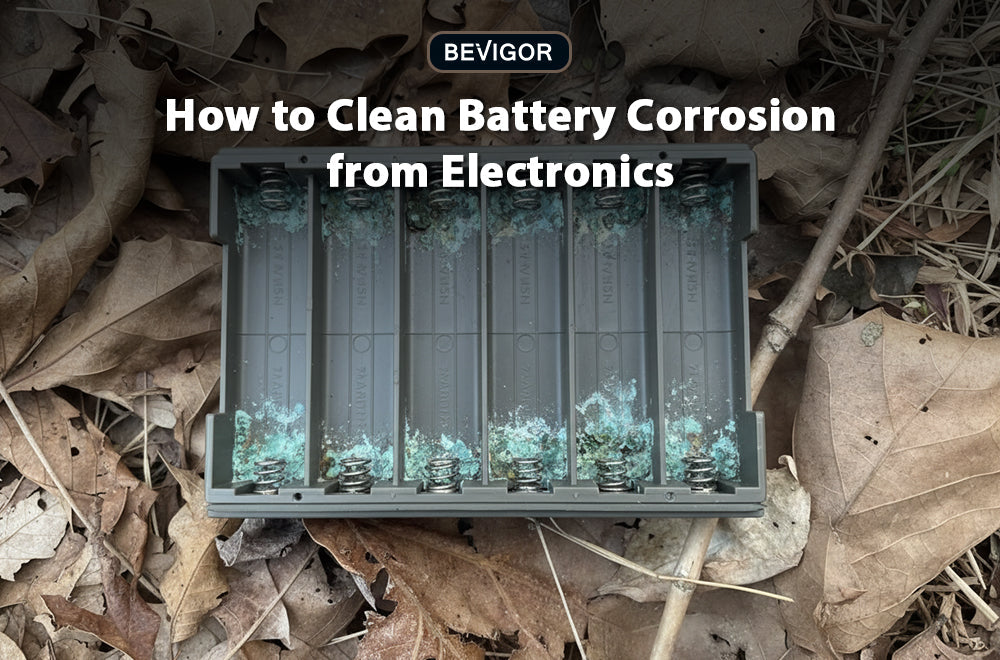
Have you ever opened the battery compartment of a premium electronic device, expecting pristine metal contacts, only to be met with an unsightly patch of crusty residue? It is a frustrating moment for any homeowner or outdoor enthusiast. This is what my content contributor Marianne said she had encountered last weekend.
Why Cleaning Corroded Lithium Batteries Requires Special Processes?
When a high-drain device suddenly stops working, our immediate instinct is to look for a quick fix to restore power. However, when dealing with modern electronics powered by a high-performance lithium battery, lithium AA batteries, or lithium AAA batteries, the cleaning process requires a precise balance of safety, chemical awareness, and hardware preservation. Knowing how to handle these situations can mean the difference between saving an expensive piece of equipment and permanently destroying its internal circuitry.

How Battery Corrosion Happens?
Before diving into the cleaning process, a quick reality check is necessary. Most of the classic "white crust" battery corrosion you see in everyday household devices is associated with alkaline battery leakage rather than lithium chemistry. Alkaline cells utilize a potassium hydroxide electrolyte that reacts with carbon dioxide to form potassium carbonate.
However, as advanced lithium AA batteries and lithium AAA batteries become the standard for high-performance applications, users must follow a universal rule that keeps them safe regardless of the underlying cell chemistry: If a battery is leaking, swollen, hot, or physically damaged, treat it as entirely unsafe and dispose of or recycle it properly.
How to Clean a Frozen Truck Flashlight
It's a common winter dilemma: We sometimes leave a heavy-duty flashlight inside a freezing truck for months. How do we clean battery acid or chemical residue out of it? Sub-zero temperatures and shifting thermal cycles can stress cell seals, leading to unexpected failures.
To tackle this safely, start with rigorous safety measures and device protection protocols:
- Power Off: Ensure the flashlight switch is completely in the off position to prevent accidental short circuits.
- Wear PPE: Put on protective gloves and eye protection, especially if there is loose, airborne powder inside the barrel.
- Careful Removal: Carefully slide or extract the old batteries from the compartment.
- Evaluate the Damage: If the internal walls of the flashlight are badly deformed or the batteries are wedged tight by severe swelling, do not force them. Forcing a compromised cell can puncture its housing. Instead, accept that the hardware is compromised and safely dispose of the entire device through a local e-waste or Household Hazardous Waste (HHW) program.
If the corrosion is light and the flashlight is structurally sound and worth saving, use a dry cotton swab or a lint-free cloth to wipe away any loose residue. If a cleaning agent is required, use minimal moisture—the applicator should be barely damp, never dripping—to prevent liquid from soaking into the deeper recesses of the compartment. Allow every component to dry completely before reinstalling fresh cells.
How to Clean a Trail Headlamp
What happens if you are miles away from town and need a reliable field hack for cleaning corroded headlamp contacts on the trail? When you are backpacking, your primary goal is to quickly improve electrical contact. You don't want to scrape off the delicate conductive plating on the terminal springs.
First, use a dry cloth or a clean sleeve to buff away superficial film. Next, utilize a classic outdoor survival trick: a standard pencil eraser. The mild, controlled abrasiveness of a pencil eraser can gently clean contacts. It rubs away oxidation without gouging the metal underneath. Avoid aggressive metal scraping with knives, keys, or files. Removing the protective plating will expose the raw base metal to rapid, recurring rust.
How to Clean Smart Door Locks and Microelectronics
Maintaining home automation hardware requires an even higher level of care. How can you safely clean battery contacts in a smart door lock without damaging the sensitive microelectronics inside? Unlike a basic metal flashlight, smart locks house intricate circuit boards, wireless radios, and motorized actuators. They are highly intolerant of liquid intrusion and electrostatic discharge.
Begin by removing the batteries immediately to cut off all power. Use a barely damp cotton swab focused exclusively on the metal terminal surfaces. Keep all liquids completely away from the exposed edges of the circuit boards and structural seams. Once the contacts are clean, let the assembly dry completely before inserting a fresh set of matched, high-quality cells.
How to Prevent Recurring Corrosion
If you find that terminal corrosion keeps coming back in a specific device, the issue is rarely a fluke. It is almost always linked to one of three chronic factors:
- Neglect: Leaving depleted batteries inside an idle device for too long.
- Mixed Cells: Mixing cells of different brands, ages, or charge levels, which forces weaker cells into a state of deep discharge or reverse polarity.
- Environmental Moisture: Allowing ambient humidity or condensation to enter the compartment.
You might wonder if household vinegar actually works to clean leaked lithium batteries from a TV remote or similar household device. While white vinegar or lemon acid is widely recommended for neutralizing basic alkaline residue, it is not a universal fix for every chemical leak. If you are unsure exactly what type of battery leaked or what chemistry was used, simplify your approach: prioritize heavy gloves, work in a well-ventilated area, use minimal liquid, ensure full drying, and never mix different cleaning chemicals. Above all, do not try to reuse a damaged or leaking battery under any circumstances.
When handling the compromised cells you just removed, follow the official environmental protocols. The Environmental Protection Agency (EPA) handling guidance serves as an excellent baseline for consumer safety: always place individual used batteries in separate plastic bags or securely tape their terminals with electrical tape before transporting them to an authorized community drop-off site or recycling center (see EPA used lithium-ion batteries guidelines).
Ultimately, keep this key takeaway in mind: cleaning is exclusively about saving your device, never about saving the battery. A leaking, deformed, or compromised battery has reached the end of its functional life and must be permanently taken out of service to protect your safety and your hardware. For any further information, feel free to contact Bevigor service.



Share:
EPA Guide on How to Recycle a Lithium Battery Safely
How to Recharge NiMH Battery Complete Beginner Guide